
Language not changing or showing the wrong language
Fix NetSpeedDisplay showing the wrong interface language: use the Language menu, follow the system, and keep the language folder in place.
NetSpeedDisplay supports many interface languages and can switch at any time without a restart. If it shows the wrong one, check these points.
Choose a language
Right-click the display, open Language and pick a language. The first choice, Following system, uses your Windows language.
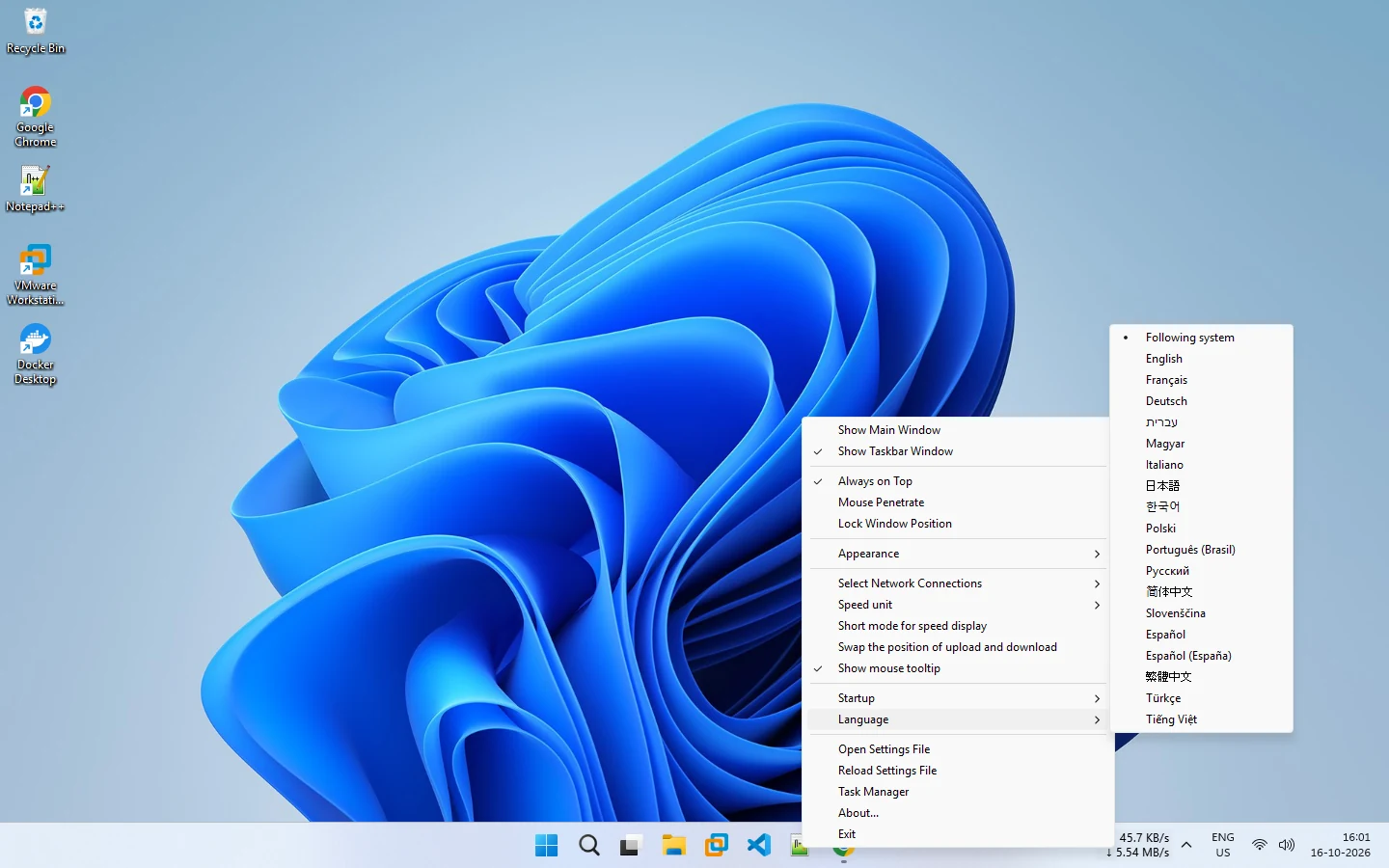
Checks
- Following system: if you want a specific language regardless of Windows, pick it by name.
- Portable copy: keep the
languagefolder next toNetSpeedDisplay.exe. If you moved only the exe, the language files are missing. - Settings not saved: if the language resets after restart, the program may not be able to write its settings. See settings not saving.
- Partial translation: some text may remain in English if a language file does not cover a string.
Menu text looks different
Menu labels in this documentation are in English. In another language, the same items appear with translated names but sit in the same places.
Report a translation problem
If a string is wrong or missing, email support with the language and what you saw.
See languages and multi-language interface.
Related pages
Languages
Switch NetSpeedDisplay between its included languages at any time without restarting.
Multi-language interface
NetSpeedDisplay includes many languages, and you can switch language at any time without restarting.
Published 2026-10-17